Shard by user or by time? Work it out with the write rate
Partitioning posts by date looks tidy until you count where today's writes land. A worked example with a hypothetical Instagram, four shards and one number that decides it.
 Dhananjay Aggarwal, · 4 min read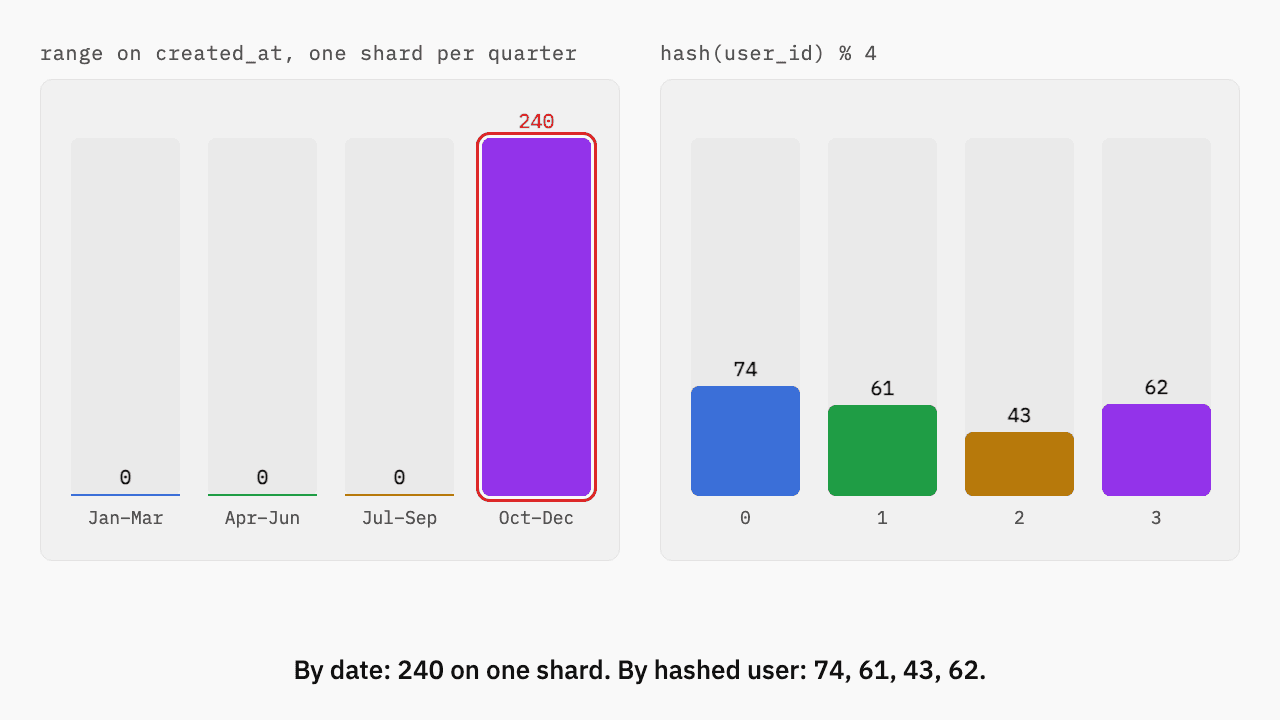
Say you're building Instagram and the posts table has outgrown one Postgres primary. You've decided to split it across four shards. The question every interviewer asks next is which column decides where a row goes, and the two answers people reach for first are the post's date and the user who wrote it.
Both sound reasonable. One of them fails on the first day, and you can show which with a single number.
The numbers we're working with#
Assume the hypothetical Instagram takes 6,000 new posts a second at peak, and that one shard's primary can apply about 5,000 writes a second before its write-ahead log and disk fall behind. Four shards give you 20,000 writes a second of total capacity, so on paper there's plenty of room.
On paper is the problem. Capacity only helps if the writes actually spread out.
Range on a timestamp#
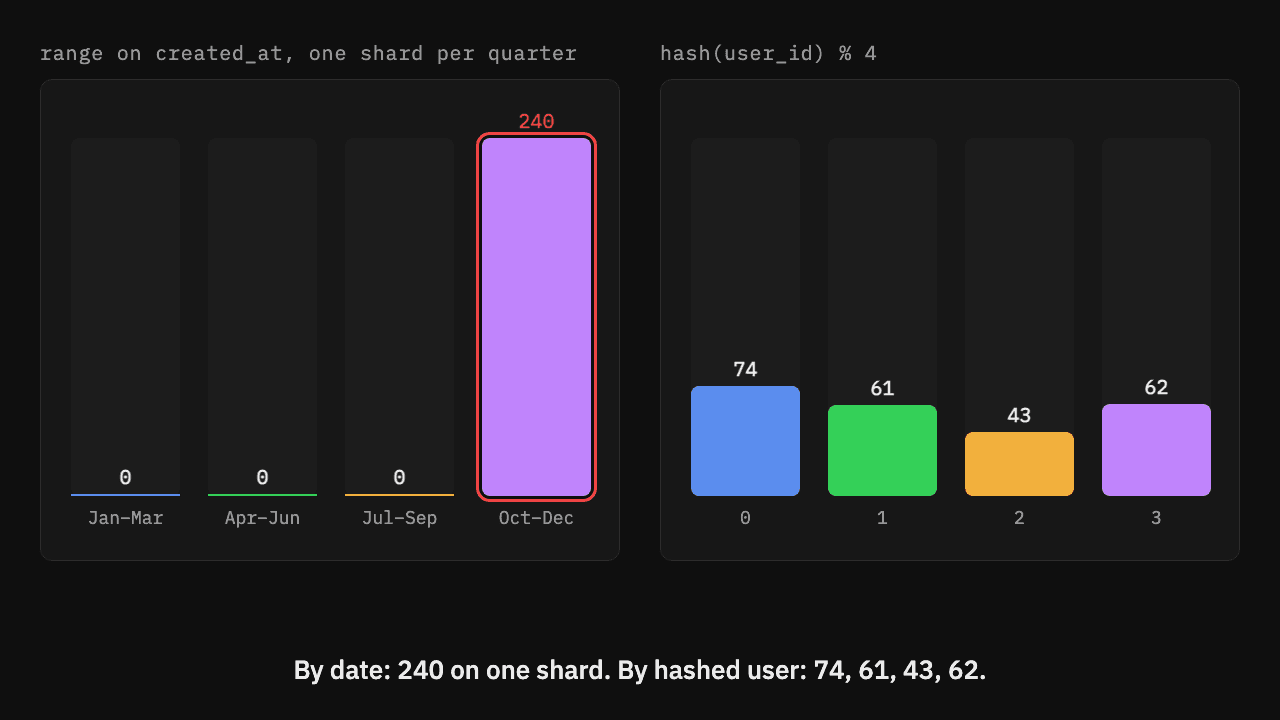
With one shard per quarter, the shard for October to December receives every new post. It can apply 5,000 a second and receives 6,000, so its backlog grows by 1,000 writes every second: 60,000 after a minute, 3.6 million after an hour. The other three shards sit idle with 15,000 writes a second of capacity between them. The chart at the top of this post is that day: 240 writes, every one of them on the October to December shard.
Range partitioning on time is still useful, just not for this. It suits data you mostly scan by date and rarely write in bulk at once, like old logs you archive a quarter at a time.
Hash of the user id#
Hashing the author's id spreads writes by person instead of by date. With millions of users posting, each shard gets close to a quarter of the traffic:
That's 6,000 / 4 = 1,500 writes a second per shard, against 5,000 of capacity. Each shard runs at 30% and has 3,500 writes a second of headroom.
What the user key costs you#
No key is free. Choosing user_id makes the queries that include it cheap and the ones that don't expensive:
| Query | Shards it touches |
|---|---|
A user's profile grid (WHERE user_id = ?) | 1 |
| A single post by id, if the id embeds the user's shard | 1 |
| Every post with a hashtag in the last hour | all 4 |
The hashtag query has to ask all four shards and wait for the slowest one. That's usually acceptable, because a search or trending page can be served from a separate index built for it, while the profile grid is on the hot path of every app open.
Pick the partition key from the queries you run most, then check where a single moment's writes land. If they all share one value of the key, as every post written today shares today's date, one shard takes the whole load however many you add.
How this comes up in an interview#
Saying "shard by user id" isn't the answer the interviewer is after. What they listen for is the reasoning: the peak write rate, how it divides across shards, the query you made expensive, and how you serve that query anyway. Expect the follow-ups too, especially what happens when one account becomes far more popular than the rest. The Sharding and partitioning lesson covers that hot-shard case and how to add a fifth shard without moving most of the data.
Filed under sharding, databases, partition-key

Written by Dhananjay Aggarwal